

Loading...
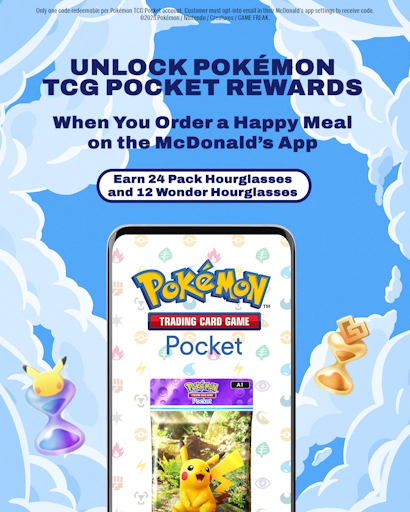
On January 21, 2025, the developers of Pokémon TCG Pocket launched their first-ever third-party promotional code redemption opportunity, in collaboration with McDonald's. The promotion, called “Dragon Discovery”, introduces a 15-card set for the physical TCG, alongside limited-time rewards for TCG Pocket. This article focuses solely on the rewards for TCG Pocket, currently available only in the US.
Reward(s)
The value of these rewards is equal to 18 Poké gold.
Availability
This promotion is available at participating McDonald’s restaurants in the US, from Jan 21, 2025, to Feb 24, 2025. The 15-digit codes are valid until Mar 31, 2025, after which point they will expire.
You can only activate one code per account. If you have multiple codes, McDonald’s suggests you should give them to friends!
Although you are only able to get the codes in the US, they can be shared to anybody in the world as the codes themselves are not region locked.
How to get the promotional items
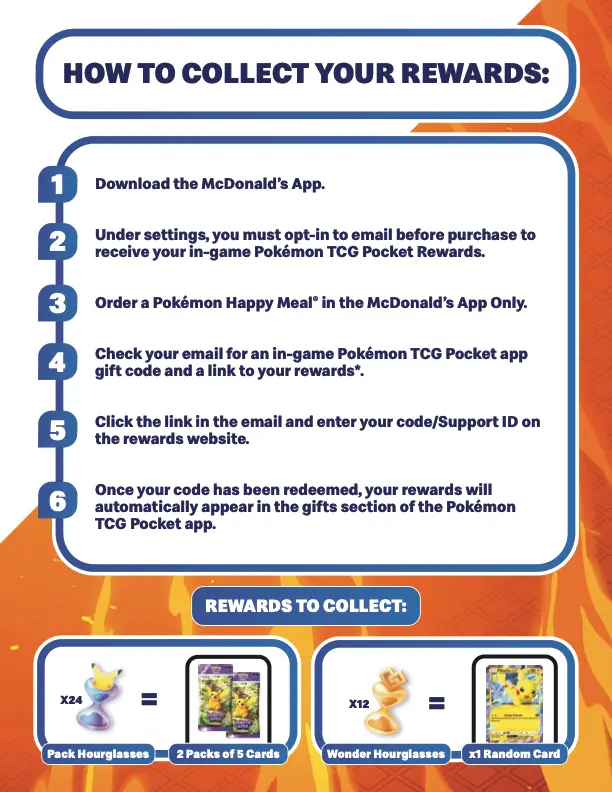
To get your McDonald’s Happy Meals rewards for Pokémon TCG Pocket, follow these steps as outlined by the game’s official US X account:
- Download the McDonald's App (US version).
- Under settings, you must opt-in to email and rewards before the purchase to receive your in-game Pokémon TCG Pocket Rewards. You must opt in to both Rewards and email communication, 2 toggles in total.
- Order a Pokémon Happy Meal in the McDonald's App Only.
- Check your email for an in-game Pokémon TCG Pocket app gift code and a link to your rewards.
- Click the link in the email and enter your code/Support ID on the rewards website.
- Once your code has been redeemed, your rewards will automatically appear in the gifts section of the Pokémon TCG Pocket app.
To redeem the code sent to your email account, you will need to visit the following URL: https://gift.pokemontcgpocket.com/.
If you did not get an email with a code, please check your spam folder or the "Promotions"
folder (Gmail only). If it is not there, it is likely that you did not opt into email marketing or rewards (step 2) before purchasing your Happy Meal – or you are not in a participating country.
If you opted into rewards, but not emails, it is still possible that you will get the reward code emailed to you retroactively if you opt into receiving emails relatively quickly.
If you ordered your Happy Meal with delivery, it is possible that you will only receive your code once the order is delivered.
The code obtained from this promotion is single-time use.
Where do I find my TCG Pocket support ID?
You can find the Support ID needed to redeem promotional codes multiple places in the Pokémon TCG Pocket app. Important: Your support ID is not the same thing as your Friend ID.
Method 1
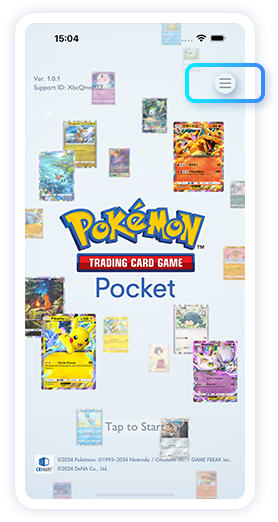
- Start the application.
- On the title screen, tap the ≡ icon at the top-right part of the title screen to open the menu.
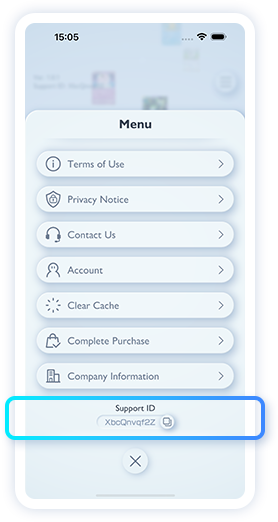
- Your Support ID is shown at the bottom part of the menu. You can copy your Support ID if you tap the copy icon to the right of it.
Method 2
- Inside the app, tap the ≡ icon to open the menu.
- Your support ID is now visible at the top of the menu. You can copy your Support ID if you tap the copy icon to the right of it.
Method 3
- Start the application.
- Your Support ID is now visible in the top-left corner, below the Version number. This code can be manually transcribed.
More information on these methods on the official website, in multiple languages: https://gift.pokemontcgpocket.com/en/howtocheck/
Troubleshooting
Gift codes cannot be redeemed in the game app itself. Please visit the Pokémon TCG Pocket redemption website to enter your support ID and gift code. The gift will then be added to your in-game account’s gift box.
- Ensure that the gift code is entered correctly.
- The gift will be added to the gift box in-game. To check if you have already received a gift, open “Gifts” and then select “Claimed.”
- It may take some time for a gift to appear in “Gifts” after you redeem the code on the website. Please wait and check again.
If you are not able to redeem a gift code or if you do not receive a gift, it may be because:
- Your save data has reached the maximum number of gifts you can receive for that gift code.
- The gift code has reached its usage limit.
- The gift code is not valid yet or the gift code expired.